Boutiques stopped asking why their order has not shipped, because the portal tells them.
Blakeley Designs is a wholesale clothing brand in Houston, Texas, selling pre-orders to hundreds of boutiques on Shopify, with suppliers' purchase orders, a warehouse and Hiveage invoices behind every order. We built them a customer portal that answers the one question that filled their inbox.
Blakeley already runs their launch invoicing through Lui: a pre-order launch of several hundred orders went from two weeks of invoicing to ten minutes.
Use cases
Customer
Blakeley Designs, Houston, Texas
What was built
A customer portal: orders, line status, invoices, a split, updates
Runs on
Shopify, Hiveage, CartonCloud
Built in
Weeks, on their real data
Systems
Shopify
The problem
The problem: one question, four systems, and no good answer
A boutique orders a pre-order collection. Weeks later they email: why is my order not being shipped? The honest answer lived in four places. The order in Shopify. The supplier's purchase order, which might be unconfirmed. The shipment on its way to the warehouse. The invoice in Hiveage, paid or not. Somebody had to open all four and write it up, hundreds of times a season.
The boutique's view was worse: a confirmation email on day one, then silence until a box arrived, with no way to pay the invoice, pull last year's invoices for their accountant, or ask for the part that was ready to ship now.
What we built
What we built: a page that says where every line is, in plain words
A link the boutique opens, like a client hub. No login to remember. Each line of each order with where it is right now, the invoices with a pay button, the updates they would otherwise have asked for, and a way to split an order so what is ready ships now.
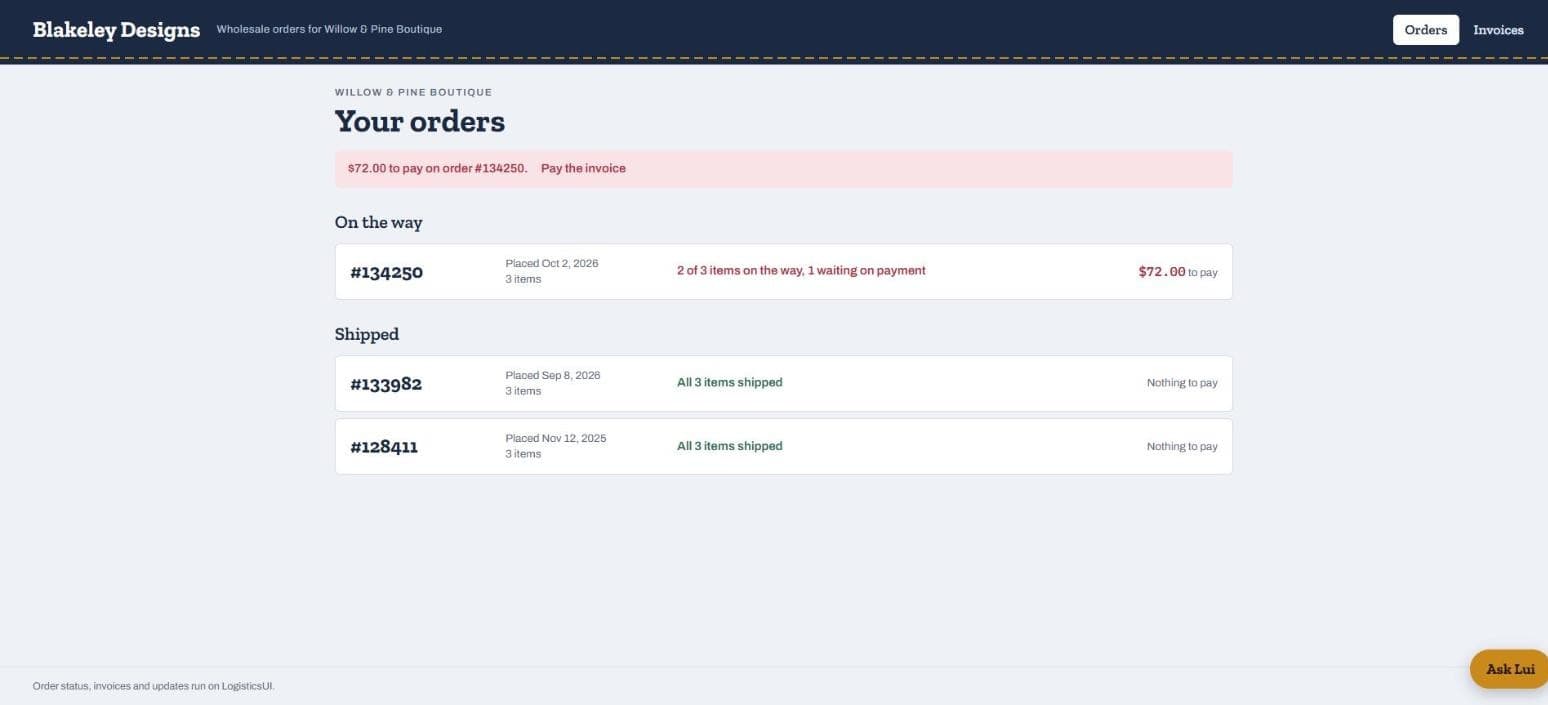
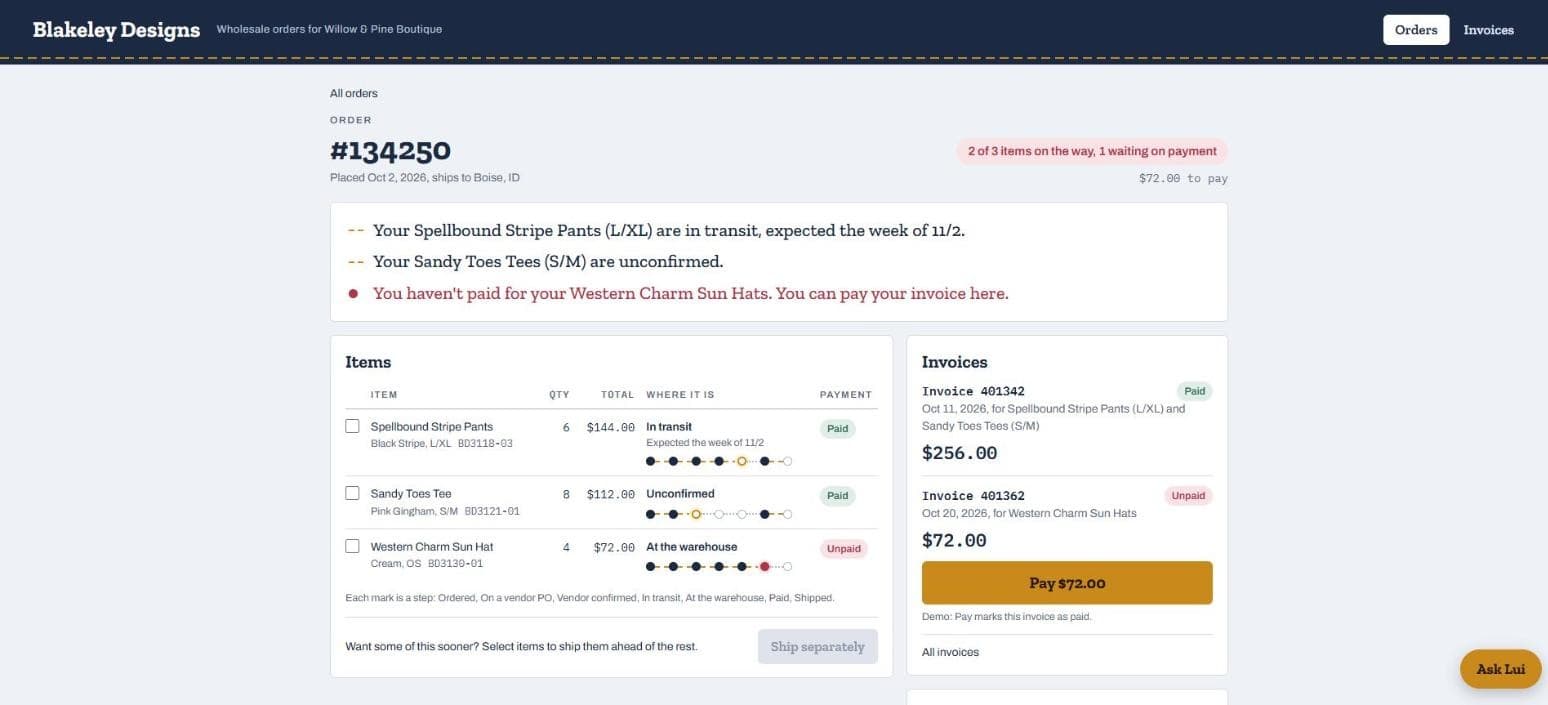
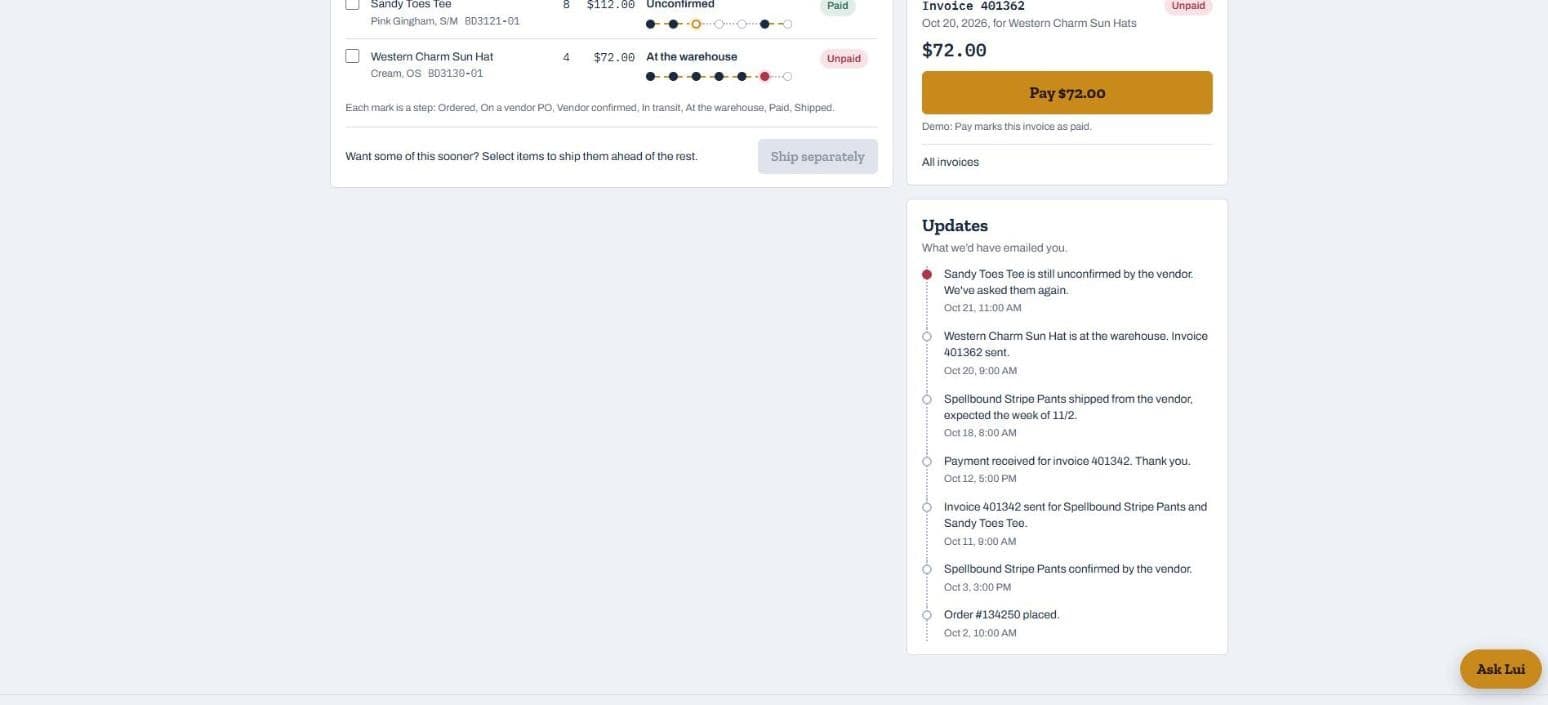
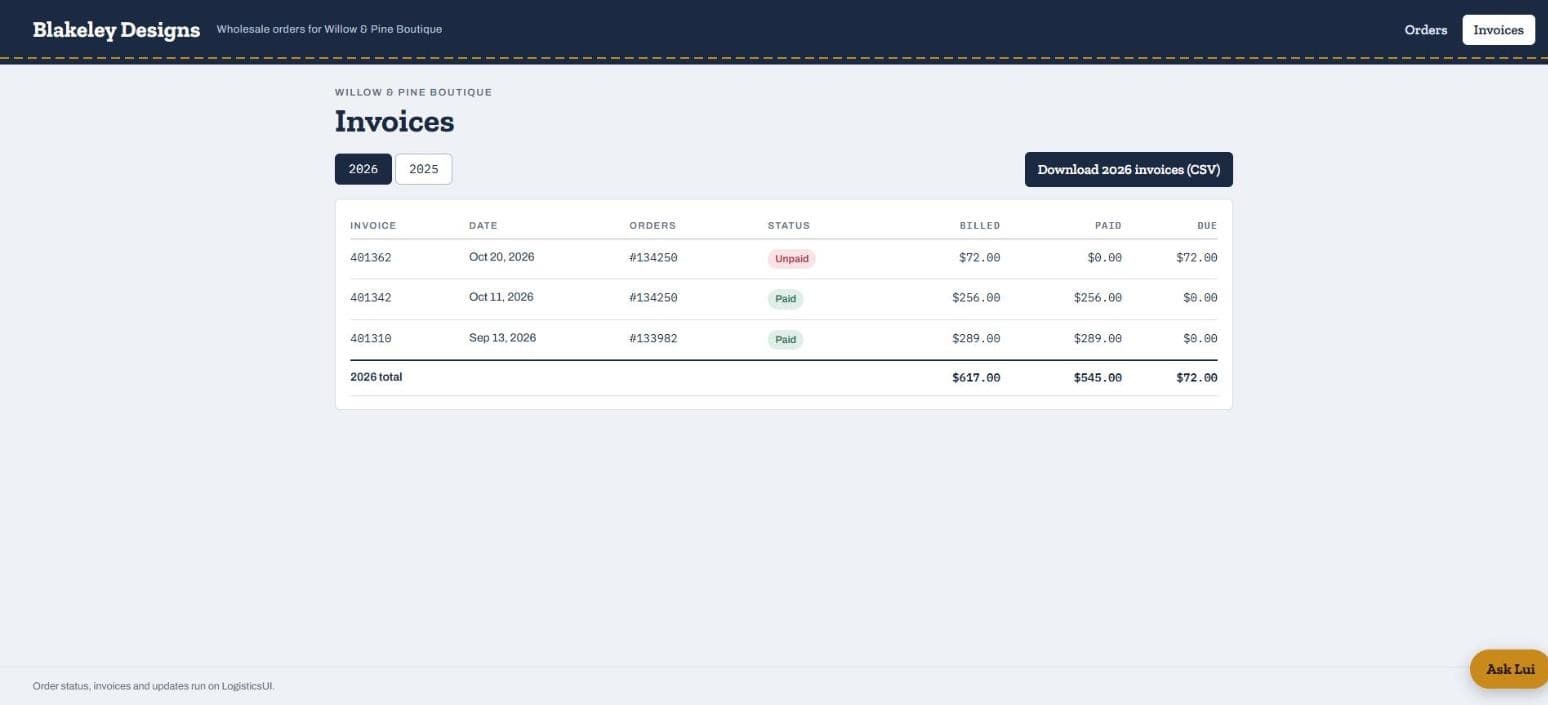
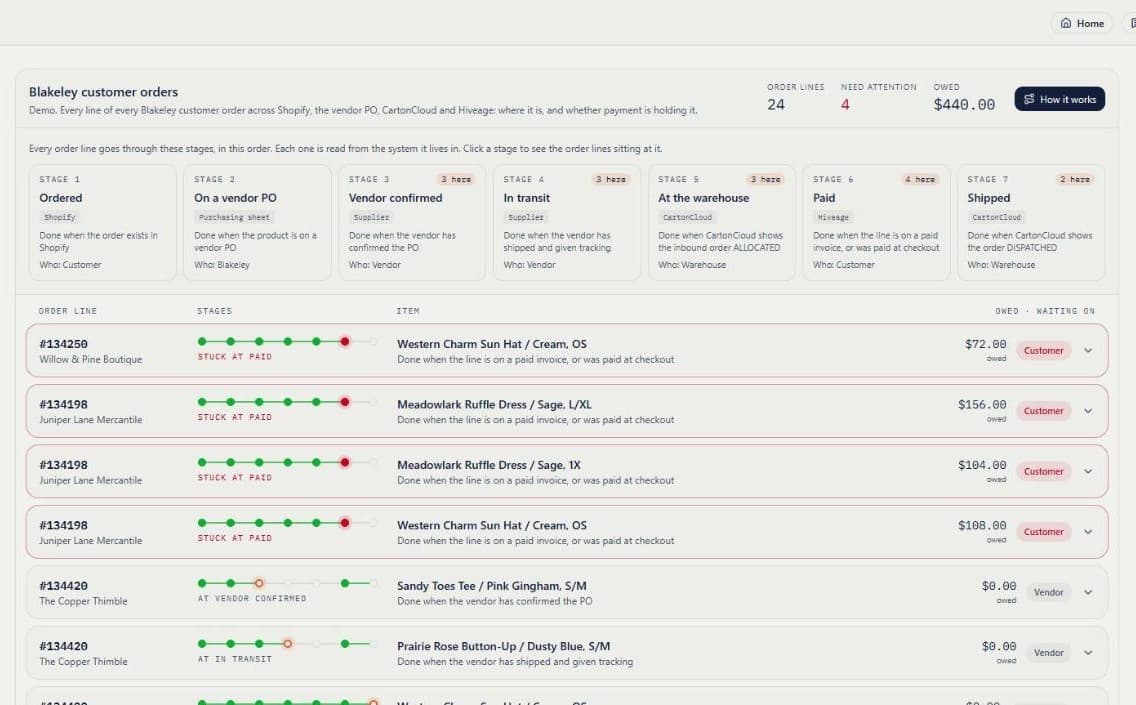
The boutique's orders. The banner at the top is the thing they used to email about: $72 to pay, with the button to pay it.One order. Each line sits on a seven-step track (ordered, on a vendor PO, vendor confirmed, in transit, at the warehouse, paid, shipped) and the top of the page says it in a sentence: in transit, expected the week of 11/2; unconfirmed; unpaid.The updates: what the brand would have emailed, written as it happens, delays included. 'Still unconfirmed by the vendor. We've asked them again.'Invoices by year with a CSV download, which is the year-end request the brand used to answer by hand.The brand's board: every order line by stage, read from Shopify, the vendor PO, the warehouse and the invoices, with what each is waiting on. The same facts the boutique sees, plus the vendor and the PO.
Want one like this on your own systems?
What changed
What changed: the answer is on the page, and the money moves
The boutique opens one link and sees the answer that used to take an email and a day: which line is held at the supplier, which is on its way, which is at the warehouse waiting on payment. They pay from the page. They split an order and the ready part ships. They pull the year's invoices themselves.
The brand's side is a board of every open order line by stage, with what is waiting on whom, read from the same data, so the person who used to write the emails sees the same facts the boutique does. The vendor and the purchase order stay on the brand's side; the boutique sees only what is theirs.
The numbers below are what Lui already does for Blakeley beside the portal, with their baselines. The portal itself was built with them; the measure of it is the emails that stop.
Built for Blakeley Designs, a wholesale clothing brand, on their order, supplier, warehouse and invoice data. The screens below are the same portal running on invented boutiques.
Blakeley Designs
Wholesale clothing brand, Houston, Texas
A Shopify brand selling pre-orders to hundreds of boutiques. Lui invoices a launch, chases the unpaid invoices, frees held stock, and tells the owner what to reorder from what actually sold. Built with them as skills; see the case study.
Two weeks10 minutesinvoicing a pre-order launch of several hundred orders
Two or three hours in a spreadsheetMinutes, from a phonethe reorder: which sizes and colours to order again, from what sold
Held for weeks behind unpaid ordersBack on sale the same daystock reserved against invoices that were never going to be paid
“It's helped me 1000%. I would never want to go backward.”
Blakeley Designs
“You already have winners but you're not reordering them. Based on past sales you didn't sell a lot of this colour. There was no way to ask that before.”
Blakeley Designs
“Tried so many apps. Didn't quite do what I wanted. One even lost us money by messing up the orders.”
Blakeley Designs
“It's helped me 1000%. I would never want to go backward.”
Blakeley Designs, on working with Lui
For you
The same build for your customers
If your customers ask where their order is, when it ships, or how to pay, the shape is the same: a link they open, each line's status in your systems' own words, the invoice payable from the page, and the updates written as they happen. It runs inside your LogisticsUI account on the systems you have already connected, so there is no new login and no new server to run.
Does the portal need my customers to create an account?+
No. Each customer gets a link of their own, like a Jobber client hub. It shows only their orders and invoices.
Where does the status come from?+
From your systems, read as they are: the store, the supplier purchase order, the warehouse and the invoicing system. Nobody types a status into the portal.
Can customers pay from it?+
Yes, when your invoicing system supports it. Blakeley's invoices are in Hiveage; the portal shows the invoice and the pay step beside the order it belongs to.
How long does a portal take?+
Weeks, not quarters. The first version runs on your real data, and you look at it with us as it comes together.