Teach it once. It runs every week.
Warehouse workflow automation starts with the exception you see every week. Orders rejected because a SKU is in the store but not the warehouse. Invoices past due. Stock under the line. Somebody has to remember to check, and the week they forget is the week it costs you.
Runs on a schedule or on an event · you can see everything it did
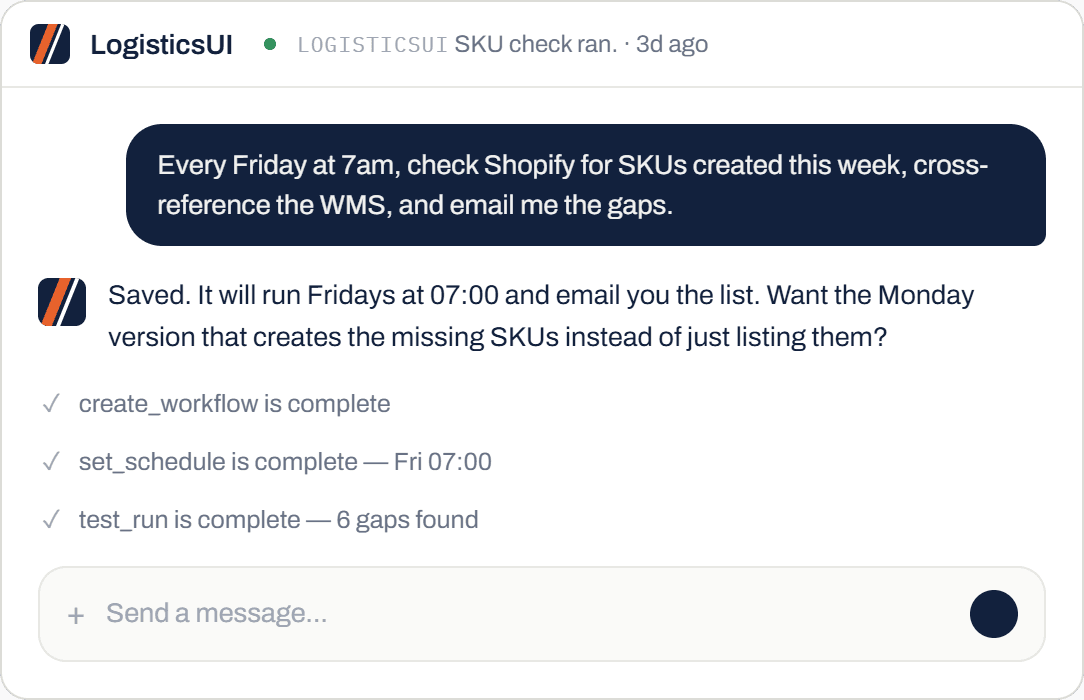
39 rejected orders, opened one at a time, SKU found, created, resynced. Some orders had 30 to 40 lines.
The Monday version creates the missing SKUs before the orders arrive, so they never reject in the first place.
The morning after the feature shipped, without being asked and without help.
39 rejected orders on a Monday morning
The integration pushes orders from the store into the WMS. A product exists in one and not the other, so the order bounces. By Monday there are 39 of them.
The manual fix is the one CartonCloud’s own guide to reprocessing rejected sale orders describes: open each rejected order, find the SKU it is missing, create the product, then reprocess the order. Their documentation is explicit that a “Product not found” error needs manual intervention before the order can go through. Some of those orders had 30 to 40 lines. It is most of a morning, and it is the same morning next week.
- Open each rejected orderOne at a time, in a list that does not tell you why until you look.
- Find the missing SKUBack to the store, find the product, copy the code and the details.
- Create it in the WMSFill the product form. Repeat for every missing line on the order.
- ReprocessPush the order through again and hope nothing else is missing.
Two ways to never do that again
The one-off fix first, because that is how everyone starts. The standing check second, because that is where it ends up.
Ask once, fixed once
Ask why the orders were rejected. It comes back with the list and the reason, then offers to create the SKUs and resync. Say yes and it does all 39.
It groups them by cause rather than listing 39 separate problems, so you can see that thirty of them are the same missing product and decide once.
About ten minutes, most of which is reading what it found.
The weekly check
Pull the Shopify SKUs created this week, check them against the WMS, email anything missing. It runs whether or not anyone remembers.
You get one email. If there is nothing to report, you hear nothing.
The version that fixes it
The same check, moved to Monday and given permission to act: create the missing SKUs so the orders never reject.
Most people run the notify version for a fortnight first. You watch what it would have done, agree with it every week, and then let it act. That is a shorter trust exercise than it sounds.
That is the difference between an alert and a workflow. One tells you. The other handles it.
Three things, and nothing else
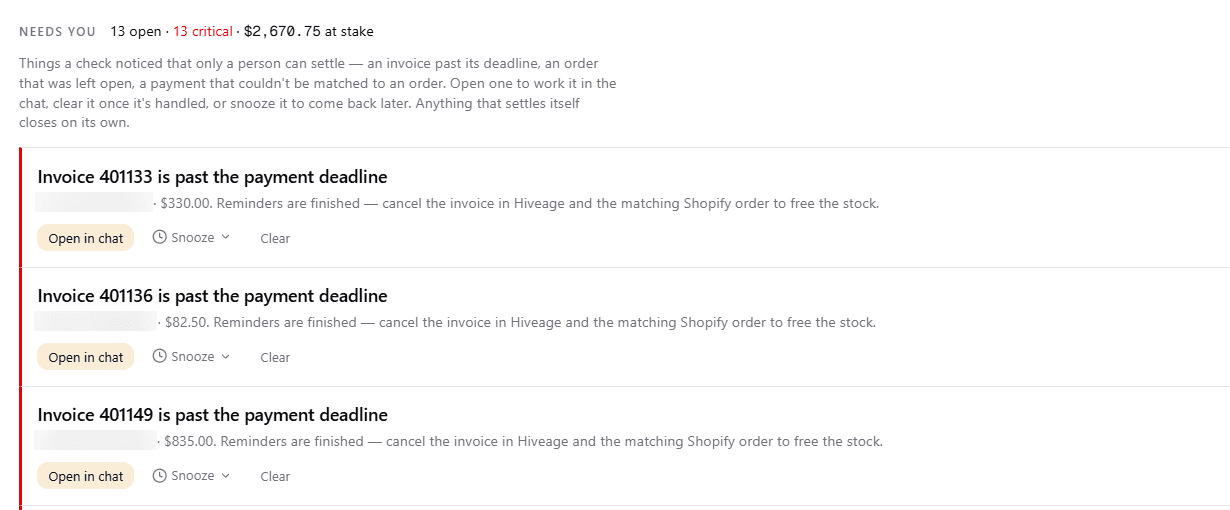
Standing workflows only work if you can see what they did. The board has three parts and no dashboard filler.
- Needs youThe exceptions only a person can settle. An invoice past its deadline, a payment that will not match an order. Open it in the chat, clear it, or snooze it.
- What I didEvery automatic action in the last 24 hours or 7 days. One line per run, newest first. Click any line to ask about it.
- Next upThe workflows with a reason to run today, either from your schedule or from the numbers.
I asked it to set up a weekly alert. Every Friday at 7am it checks Shopify for new SKUs, cross-references the WMS, and emails me the activity. Oh my goodness, I don't even have to remember to do that.
Senderoo, 3PL warehouse
Questions we get asked
How do I set one up?
You describe it in the chat. What to check, when to check it, and what counts as a problem. It repeats the rule back, runs a test, and saves it.
Can it trigger on an event, or only a schedule?
Both. Daily and weekly schedules are the common ones. Event triggers work the same way: stock under a threshold, an order in a certain state.
Can it act, or does it only notify?
Whichever you tell it. Most people start with notify, watch it for a couple of weeks, then let it act once they trust what it is finding.
Can I see what it did?
Yes, and this is the part that matters. Every run is one line on the board with what it changed. Nothing happens silently.
What if it gets it wrong?
You will see it in the log and can tell it what the rule should have been. Usually it is a rule it was never given rather than a mistake in what it did.
Bring the check you keep forgetting
The one somebody is supposed to do every Monday. We will set it up live on the call and you can watch it run.