Skip to content
Skills

Lui comes knowing how warehouse jobs are done, then learns how you do them.

Pick a ready-made skill, answer a few questions, and Lui runs the job your way from then on. Blakeley Designs' pre-order invoicing went from two weeks to 10 minutes.

Senderoo's team wrote their own: a SKU check somebody had to remember now runs every Friday at 7am by itself.

Lui is an assistant that works inside the systems your business already runs on and does the admin for you.

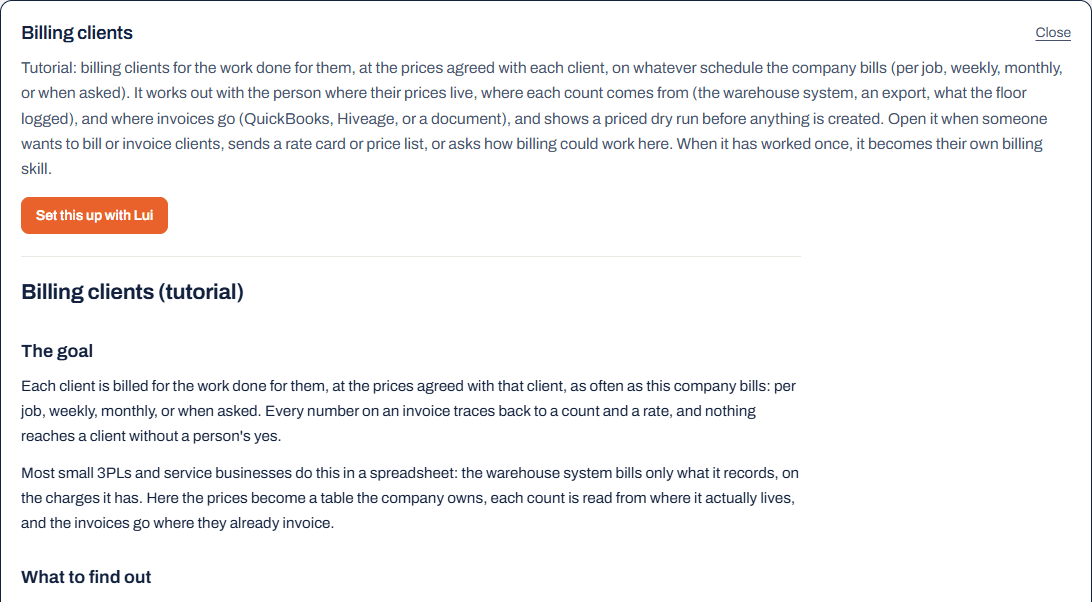
The billing tutorial opened in LogisticsUI's Settings under Skills, with its goal written out and a button to set it up with Lui.
A real screen: every skill opens as a page you can read, in Settings.
The short answer

What is a skill?

A skill is a written playbook Lui follows for one job: what to read, which of your systems to use, what to check, and what needs your yes before anything changes. It is a warehouse workflow template that ends up written in your words.

Some come ready: tutorials for jobs every warehouse does its own way, and general skills that work on day one. The rest are yours, written after Lui has done a job once with you, and you can read and change every one of them in Settings.

How it works

From a template to your own skill in four steps.

  1. Pick a job

    Start from a tutorial, or tell Lui about a job you do by hand today.

  2. Lui reads, then asks

    It reads what your connected systems already hold and asks only for what is missing, as one list.

  3. Check a dry run

    It does the job once on your real data and shows you the result before anything is created or sent.

  4. It becomes your skill

    Lui saves your version under your own name. Ask for it by name, or let a rule run it on a schedule.

Tutorials

Three jobs every warehouse does its own way.

Each one knows what the job is for and what it needs to find out. Your schedule, your sources and your rules replace the example.

rate card → invoices for your yes

Bill clients from your rate card

Storage, receiving, picks and the extras the floor does, priced from each client's own rates, per job, weekly or monthly. Invoices wait in QuickBooks or Hiveage until you approve them. How it works →

partial pallets → one move list

Consolidate stock and free up locations

Lui finds the same product spread across half-empty pallets and writes a move list for the floor that respects what each location holds and what may be mixed.

a link · scanner-ready

Build a form for customers or the floor

Turn the Word form you email out into a link people fill in, or make a new one for counts and checklists. Every answer is stored, and a rule can act on each one.

General skills

Skills that work on day one.

Every account has them, and each one is the worked example for jobs like it: a bill of lading starts from the Doc 60.

your template · a PDF

Your documents, filled from the order

A bill of lading, a packing slip or a quote on your own Word template, filled from the order so nothing is retyped.

Doc 60 · DSWR

BC liquor paperwork

The Doc 60 for each shipment and the LDB's weekly DSWR file, checked line by line before it is written. Doc 60s →

a schedule · or an event

Alerts and automatic jobs

A check that runs by itself and tells you only when something needs you, or fixes it if you let it. Alerts →

one batch · one yes

A hundred of the same thing at once

Orders from a spreadsheet, products from a list, an invoice for every client: built as one batch you confirm once. Order entry →

Your skills

The skills that run your business are yours.

Written in your words after Lui has done the job with you, and kept in your account.

  • Written from the chatWhen a job has worked, Lui offers to save how it was done. Next time it is one sentence.
  • Read and changed in SettingsEvery skill opens as a page you can read, and yours can be edited right there.
  • Run on a scheduleA rule can run a skill every Monday and send the result to whoever needs it.
A customer

How Blakeley Designs runs on its skills

Blakeley Designs

Wholesale clothing brand, Houston, Texas

A Shopify brand selling pre-orders to hundreds of boutiques. Lui invoices a launch, chases the unpaid invoices, frees held stock, and tells the owner what to reorder from what actually sold. Built with them as skills; see the case study.

  • Two weeks10 minutesinvoicing a pre-order launch of several hundred orders
  • Two or three hours in a spreadsheetMinutes, from a phonethe reorder: which sizes and colours to order again, from what sold
  • Held for weeks behind unpaid ordersBack on sale the same daystock reserved against invoices that were never going to be paid
“It's helped me 1000%. I would never want to go backward.”
Blakeley Designs
“You already have winners but you're not reordering them. Based on past sales you didn't sell a lot of this colour. There was no way to ask that before.”
Blakeley Designs
“Tried so many apps. Didn't quite do what I wanted. One even lost us money by messing up the orders.”
Blakeley Designs
Try one

Start with the job you do by hand every week.

Pick a tutorial or describe the job, and Lui does it once with you before saving anything.

FAQ

Questions people ask before they start

Do I have to write anything?

Only if you want to. Lui writes the skill from the job you did together, in your words, and shows it to you before saving. You can change any line later.

Can I change a skill later?

Any time. Open it in Settings under Skills and edit it there, or tell Lui what changed and it rewrites it.

What if no skill fits my job?

Describe the job. Lui puts it together from your connected systems, forms, tables, documents and rules, builds a first version you can try, and saves it as a skill once it works.

Can a skill run on its own?

Yes. A rule runs it on a schedule or when something happens, and sends the result to whoever needs it, by email or to a WhatsApp group. Alerts and automatic jobs →

Also:For CartonCloud3PL billingAlerts and workflowsInvoicing and reordersDoc 60

Get started

Bring the job you keep doing by hand.

Create your account, pick a skill, and watch Lui do it once on your own data. The first $20 of usage is free.

Set up my first skill

Google or an email address. $20 of usage free, no card.

Or have it built and run for you: custom work, at a fixed price per project.